Files & utilities · Available
Vinverse Tools
Prepare images, organize PDFs and package files without installing a separate application for each task.
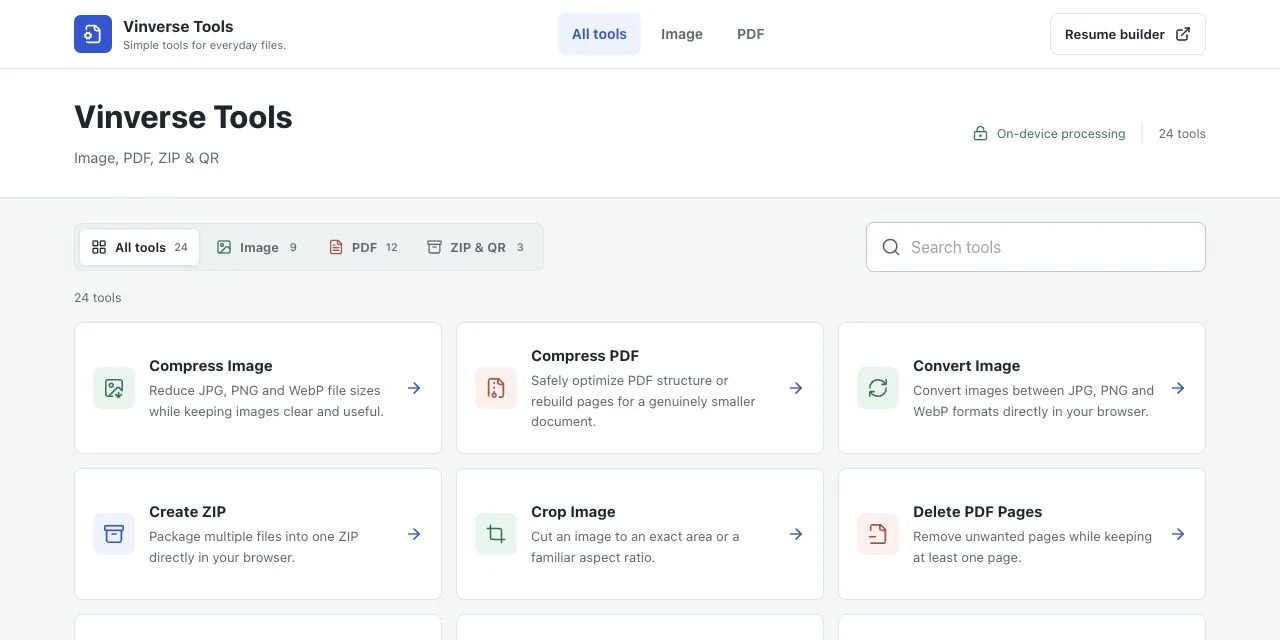
What it is
A file task should have a clear beginning and end: select an original, choose an operation, inspect the result and download a new copy. Vinverse Tools brings image, PDF, ZIP and QR utilities into one searchable catalogue. The published file operations run in the browser, so an upload queue is not part of those workflows. Keep the original file: an exported result is a separate document, not a backup service.
The problem it helps with
A form may require a smaller image while a colleague needs several pages combined into one PDF. Installing a large editor for either small job adds setup without necessarily improving the result.
Who it is for
People preparing application documents, sharing photographs, combining paperwork or sending an organized set of files.
What you can do
Image preparation
Resize, crop, compress or convert supported images. Dimensions and file size solve different problems: check the destination's requirement before deciding which operation to use.
PDF organization
Merge, split, rotate, extract and reorder pages. Review the page order before saving, especially when combining scans with different orientations.
ZIP and QR utilities
Package files into an archive, inspect supported archives or generate a QR code. Opening an archive or scanning a code still requires care about the original source.
How it works
- Choose the operation that matches the destination's actual file requirement.
- Select a copy of your file and adjust only the settings you need.
- Inspect the preview and download the result. Reopen it before sending.
Useful situations
- Reduce an application photograph to the accepted dimensions and size.
- Combine supporting documents in a deliberate, readable page order.
- Send a project folder as one archive while retaining its original files.
Why a focused product?
Small file jobs recur across work, study and personal administration. Keeping each operation focused makes it easier to see what changed and whether the result is suitable.
Before you rely on it
Browser memory, source format and device capability affect large-file processing. Compression can reduce quality; a PDF operation may not preserve every interactive feature. Test a copy first.
Processing, storage and account requirements vary by operation. Read the notice in the application and the Privacy policy. Keep an original copy of important work.
Product questions
Where do I use Vinverse Tools?
The application runs at tools.vinverse.co. This page is its overview; the launch link takes you to the separate product.
What if something is missing or does not work?
Check the current application options first. Report a problem with the page URL, browser and steps to reproduce it, without including sensitive files.